FliPAAS Journal · Reporting & planning
Visitor reporting: five measures that help you improve the day
Choose a small reporting set that helps reception and managers ask better questions, with a worked example you can adapt.
FliPAAS Team · · 4 min read

Start with the question you need to answer
A report becomes useful when it informs a decision. Before collecting more measures, write down the operational questions your team asks. Do you need to understand when reception is busiest, whether appointment details are complete, or which visit types require the most coordination? Each question suggests a different way to organise the records.
Choose a small starting set. For many reception teams, arrival volume, visit purpose, expected versus unplanned arrivals, completeness of appointment information, and open visit records provide a practical conversation. These are suggestions for reviewing your workflow, rather than a claim that every organisation should use the same dashboard or target.
Read volume alongside the time of day
A daily total can hide the moment when reception needs the most support. Group arrivals into intervals that make sense for your operating hours. Compare similar working days and identify whether a high-volume period is predictable. A busy morning may call for better preparation even if the full-day total appears manageable.
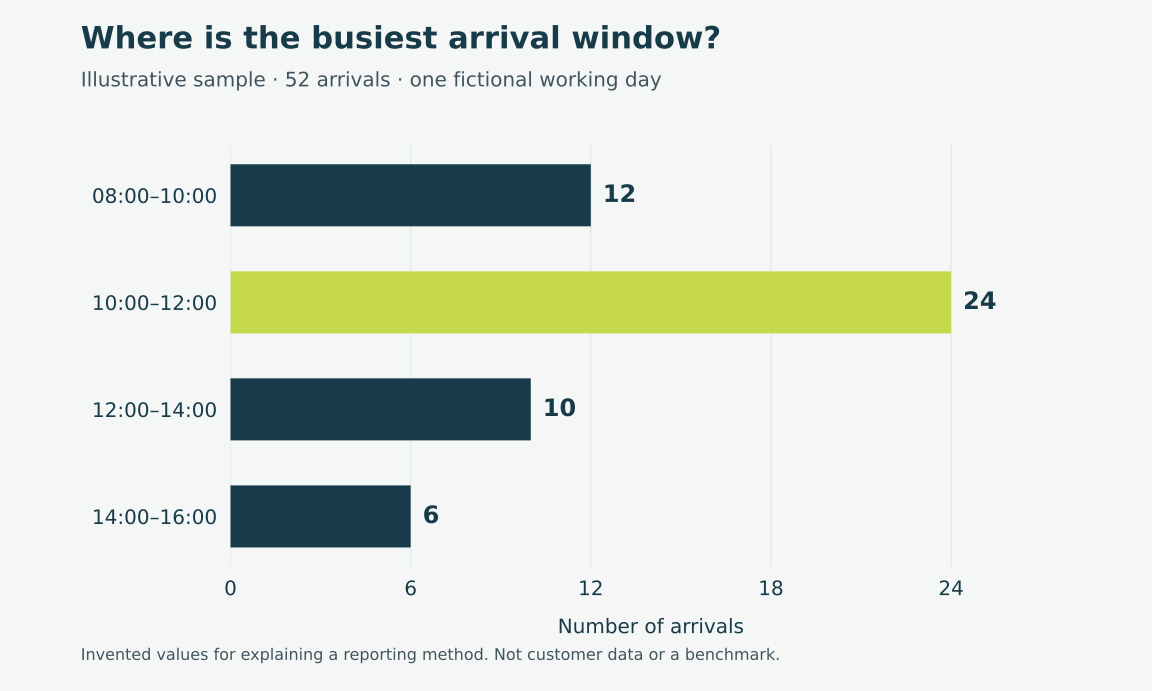
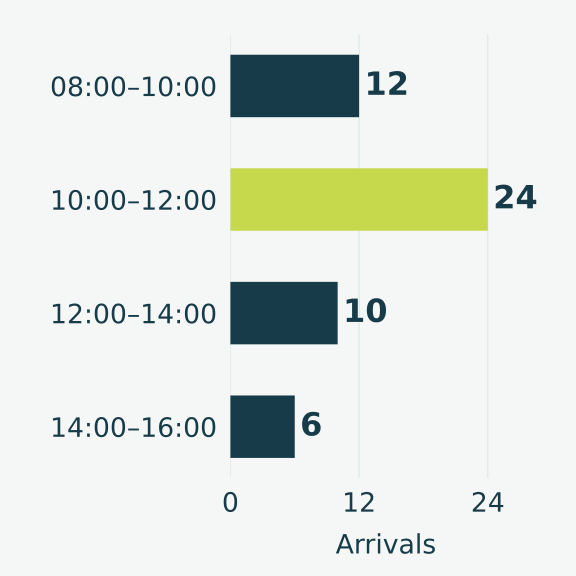
The chart in this article uses a deliberately small, invented example: 12 arrivals from 08:00–10:00, 24 from 10:00–12:00, 10 from 12:00–14:00, and 6 from 14:00–16:00. It is an illustration of how to read a pattern, not a customer result, a benchmark, or a forecast. Replace the numbers with an appropriately scoped export from your own operation.
Keep definitions consistent
A measure is difficult to interpret if teams count it differently. Define whether a visitor record represents a person, a visit, or a group arrival. Agree how cancellations, repeat visits, and appointments that change time should be interpreted. Record the time period and location alongside any comparison so that a number does not lose its context.
Write the definition next to the working report. Explain who prepares it and which records it includes. If the process changes, note the change before comparing the new figures with older periods. A straightforward measure with a stable definition is usually more useful than a sophisticated calculation built on inconsistent records.
Use a worked calculation to avoid ambiguity
In the illustrative arrival example, the four intervals contain 52 arrivals in total. The 10:00–12:00 interval accounts for 24 of those arrivals. Dividing 24 by 52 gives approximately 46 percent. That calculation describes the concentration in this fictional sample; it does not show how quickly reception served anyone or why that interval was busier.
This distinction matters when presenting results. Volume cannot stand in for service time, and an open record does not automatically establish that someone is still on site. Pair the number with an explanation of what the underlying record represents. If a report cannot support a conclusion, say so and identify the additional information needed.
Turn the review into a practical adjustment
Use the reporting discussion to choose one action. A team might ask hosts to complete appointment details earlier, clarify the check-out process, or prepare a reception handover before a predictable peak. Name the owner and explain when the team will review the change. Avoid producing a report that ends without an operational decision.
Keep the discussion close to the staff who manage visits. Reception can explain why a particular record needed correction or why one period felt unusually busy. Managers can help remove recurring obstacles across departments. Together, they can distinguish a process problem from an isolated event before changing the whole workflow.
Keep reporting proportionate to its purpose
Visitor records contain information about real people. Use access appropriate to the role and follow your organisation's data-handling and retention policies. Share only the detail needed for the review. A general operational summary may not need the personal information included in the underlying visit record.
FliPAAS visitor reporting and exports can support a more organised review of your visitor activity. Ask which available views and filters fit the question you are trying to answer, and confirm the permissions involved. Bring one reporting question and a sample of your current process to a demonstration so the discussion stays focused on a decision your team actually needs to make.
Create a one-page reporting brief
Before requesting a new dashboard, write a short reporting brief. State the decision you need to make, the records that could inform it, the location and period involved, and the person who will act on the result. Include the definition of any count or percentage you intend to use. This makes it easier to recognise when a report is missing relevant context.
Use a small, appropriately handled sample to test the brief with reception. Ask whether another person would calculate the same number from the same records. If not, refine the definition before presenting a trend. Finish the review with one action and one limitation of the data. A reporting conversation becomes more trustworthy when the team can explain both what the figures show and what they cannot establish.
Put the workflow into practice
- Choose the operational question.
- Define the records and time period.
- Review the pattern with reception.
- Assign one action and a review date.